A buyer relocating to a new market used to start with a search engine and a page of blue links. Today that same buyer is just as likely to open ChatGPT and type a full question: "Who is the best agent for oceanfront condos in Wailea?" or "Which brokerage knows ski-in, ski-out homes in Aspen?" “What agent specialized in Short-term rentals?” ChatGPT answers with names.
Until this month, you had no say in what it knew about your business. That changed on November 10, 2026, when OpenAI launched Businesses in ChatGPT in beta. For the first time, you can claim your business, verify it, and manage how it appears to the 1.2 billion people OpenAI says use ChatGPT every week.
This guide walks through the entire process from a real estate agent's point of view, including the places where the form was clearly built for stores and restaurants, and what to choose instead.
What Is Businesses in ChatGPT?
Businesses in ChatGPT is OpenAI's version of a business listing, and Business Hub is the dashboard where you manage it. If you have ever set up a Google Business Profile, the idea will feel familiar. Business Hub does three things for an agent or brokerage:
- Claim and verify. You prove you own the business and its website. Approved profiles carry a blue verification badge.
- Control your details. You set your business name, category, description, website, and contact information instead of leaving ChatGPT to piece them together from around the web.
- See how you are discovered. An insights view reports how often ChatGPT mentions you, how many people view your profile, and how many click through to your website.
- You are verified while your market is not. In most cities, a few hundred agents compete for the same buyers and sellers. For now, almost none of them have a verified ChatGPT profile. A blue badge next to your name is a trust signal your competitors do not have yet.
- Your description is in your words. The setup form notes that ChatGPT may share your description in relevant conversations. If you do not write it, you are leaving that summary to chance.
- Your data starts sooner. Insights are reported in rolling 28-day windows. The agent who verifies this month will have months of trend data on mentions and clicks before the agent down the street has logged in.
- Habits are forming now. Consumers are deciding today whether an AI assistant is where they go for local recommendations. Agents who treated Google Business Profile seriously in its early years spent the next decade ahead of those who waited. This is the same kind of moment.
- A ChatGPT account. Use a login you will keep long term. For a brokerage, decide up front who owns the profile.
- A government-issued ID and a phone with a camera. These are for the identity check.
- Access to your domain's DNS settings. If someone else manages your website, loop them in before you begin.
- Your business details. Public name, legal name, any DBA, business type, physical address (P.O. boxes are not accepted), registered address if different, and your tax ID.
- A business email and phone number. Both are optional but worth adding.
The launch also included Business Agents, which are branded AI assistants for eligible ecommerce and online service companies in the United States. You do not need one. The profile is the piece that matters for real estate right now, and it is free during the beta. OpenAI has not announced pricing beyond that.
Why First Movers Have the Advantage
One caveat belongs up front: OpenAI says plainly that claiming a profile does not guarantee better placement in answers. Nobody can promise that early claimers get favored. What moving first does give you is practical, and it costs about half an hour.
What to Gather Before You Start
Have these five things ready and the process goes quickly.
The DNS requirement deserves a second look. Website verification only works on a domain you control. If your only web presence is a profile page on your brokerage's site, you cannot add a DNS record to it, and you cannot verify. Agents who own their own domain have a clear path through this process.
One more note for licensed agents: use the business name that matches your license and your brokerage's advertising rules. If you are unsure, ask your managing broker before you submit.
How to Claim Your Real Estate Business on ChatGPT, Step by Step
Step 1: Open Business Hub and Search for Your Business
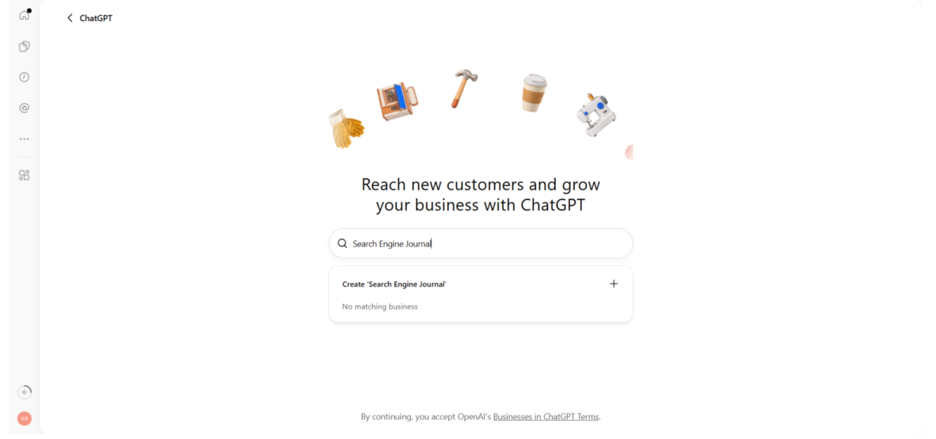
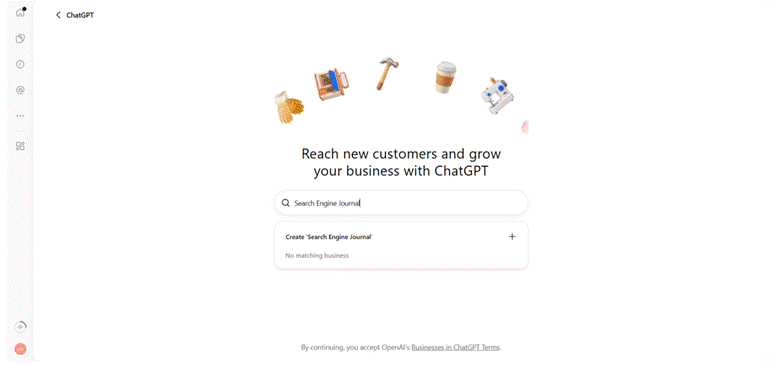
Sign in to ChatGPT and open Business Hub. Search for your business name. If a match appears, select it. If nothing matches, which will be the case for most agents today, choose the option to create a new profile.
Step 2: Choose "Through a Website"
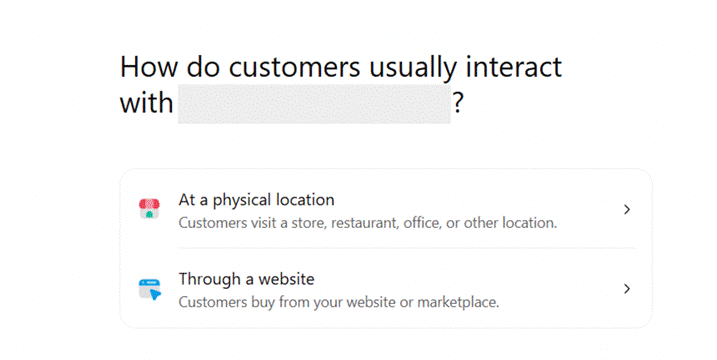
ChatGPT asks how customers interact with your business: at a physical location or through a website. Choose the website option. In early testing, the physical location path led to a waitlist, and claiming existing local listings is currently limited to U.S. stores and restaurants. The website path goes straight to verification.
Step 3: Verify Your Domain
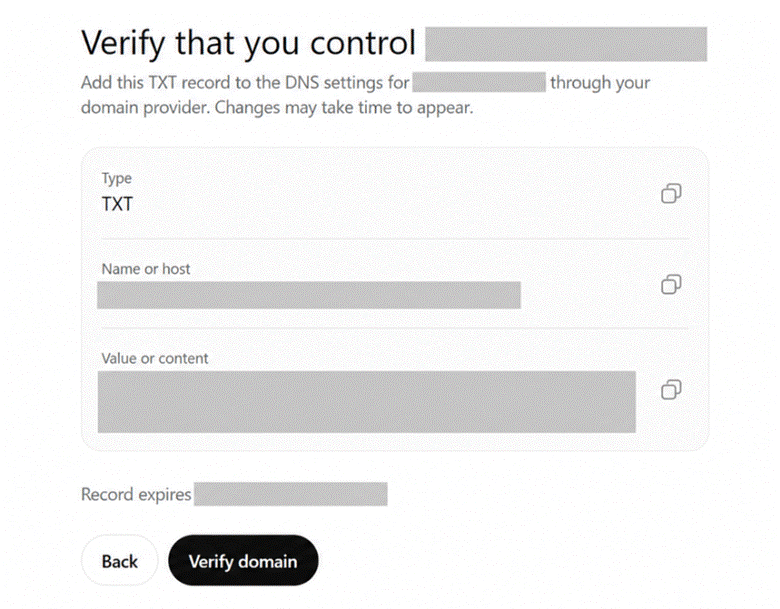
ChatGPT gives you a DNS TXT record with a type, a name, and a value. Add it wherever your domain's DNS is managed, wait for the change to take effect, then return to ChatGPT and select verify. DNS updates can take anywhere from a few minutes to several hours, so do not worry if the first attempt fails.
Step 4: Pick a Category and Write Your Description
Select the closest real estate category from the predefined list. Then write your description with care, because this is the text ChatGPT may share in conversations. Say what you do, who you serve, and where. A simple formula works:
[Name] is a [brokerage] agent helping [buyers, sellers, or investors] with [property types] in [specific neighborhoods and city].
Specifics beat adjectives. "Luxury condos in Wailea and Makena" tells an AI assistant far more than "top-producing agent with unmatched service."
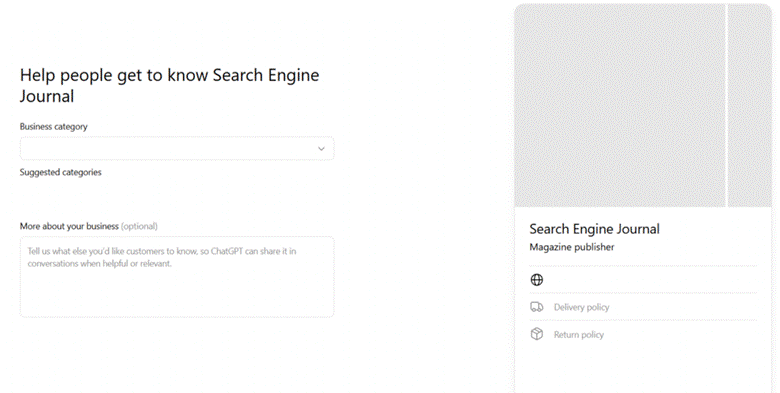
Step 5: Add Contact Details and Answer the Policy Questions
Add your business email and phone. You will then be asked about delivery and returns. These questions were written for retailers and do not apply to real estate. Select the options indicating you offer neither, then check the profile preview, because your answers show up there.
Step 6: Save Your Draft
ChatGPT saves the profile as a draft and sends you to your business overview. The confirmation screen may offer an advertising credit and a paid plan upgrade. Neither is required. According to OpenAI's setup FAQ, you can manage an approved profile without running ads.
Step 7: Verify Your Identity and Business Details
The identity check runs through a service called Persona. Scan the QR code with your phone, allow camera access, and follow the prompts. No app download is needed. Then confirm your business information: name and DBA, country, business type (sole proprietorship or entity), tax ID, website, and physical address.
Step 8: Submit and Check Your Status
Review everything, then submit. Approval can come through almost instantly, but yours may show as under review first. Check back on your business overview page. Once approved, your profile publishes automatically and the blue verification badge appears.
What to Do After You Are Approved
Read your insights the right way. Business Hub reports mentions, profile views, and website clicks. A mention is only counted when ChatGPT references your website. Your name appearing on its own does not count. The numbers are aggregated, and you will never see anyone's private conversations. Compare them against your own website analytics for the same dates.
Invite your team. Select Invite in the upper-right corner of your business overview and enter a teammate's email. Each person needs their own ChatGPT account.
Brokerages, plan for each office. For now, Business Hub does not yet offer central management for multiple brands or locations. Claiming your main brand does not extend to individual offices, so each one needs its own profile for now.
Keep it current. Set a quarterly reminder to review your description, contact details, and service areas. An outdated profile with a verification badge is worse than no badge at all.
A Claimed Profile Is the Starting Line
Your profile tells ChatGPT who you are. It does not tell ChatGPT why you are the right answer. The assistant still makes its own recommendations, and it builds them from what it can read and cite on the open web.
Remember how mentions are counted: only when ChatGPT references your website. That means the agents who show up most will be the ones whose sites answer the questions people are asking. Two examples show what that looks like in practice.
In Colorado, Ryan Schwartz built Aspen.realestate around the questions luxury buyers bring to that market. One article simply answers What is Billionaire Mountain? That is exactly the sort of plain-language question someone types into ChatGPT before they ever call an agent.
In Hawaii, Christopher Barca's Maui.realestate organizes the whole island by region and community. A buyer asking an AI assistant about Wailea versus Kihei or Kapalua is asking a question that site has a dedicated page for.
Notice what both have in common. The domain itself states the market and the subject before a single page loads, and the content underneath goes deep on specific neighborhoods instead of broad claims. A verified profile on top of a site like that gives ChatGPT two things at once: a confirmed identity and something specific to cite.
To build toward the same position:
- Write pages that answer one real question each, in the words your clients use.
- Keep your name, address, and phone number identical on your website, your Google Business Profile, and your ChatGPT profile.
- Match your Business Hub description to the niche your website proves you know.
Frequently Asked Questions
Is it free to claim my real estate business on ChatGPT?
Yes, during the beta. OpenAI has not announced pricing for later.
Do I need a paid ChatGPT plan or an ad budget?
No. You will see offers for both during setup, but neither is required to manage an approved profile.
Will claiming my profile make ChatGPT recommend me?
Not on its own. OpenAI states that claiming does not guarantee placement. It gives you accurate information, a verification badge, and data. Your website and reputation do the rest.
Can I claim a profile if I do not have my own website?
It is difficult today. The website path requires a domain where you can add a DNS record, and the physical location path has been waitlisted in early testing.
Can my brokerage claim profiles for every office at once?
Not yet. There is no central management for multiple locations, so each office is claimed separately.
The Takeaway
The way people find an agent is shifting from searching to asking. Businesses in ChatGPT is less than a month old, the process takes about thirty minutes, and in most markets the field is wide open. Claim your profile this week, write a description that names your niche and your neighborhoods, and then keep building the kind of website that gives an AI assistant a reason to mention you.
Businesses in ChatGPT is in beta. Features, eligibility, and verification steps are subject to change, so confirm the current process in Business Hub before you begin.